
HIIS-1 (HIS-1)
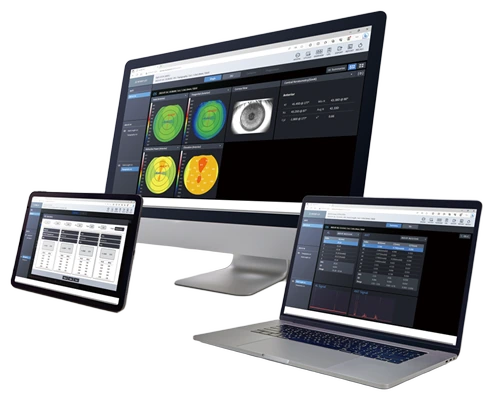
Software for viewing examinations from compatible devices.
Display a single examination to view its data.
Key advantages
The documented strengths of HIIS-1 (HIS-1), at a glance.
Single-examination view
Display a single examination to view its data.
The brochure uses HIS-1 and HIIS-1. Version, licences, modules and connected devices must be confirmed.
Six-examination view
A six-examination view to bring results together.
DICOM exchange
DICOM protocol for exchange with compatible systems.
Capabilities in practice
A closer look at the functions and technology of HIIS-1 (HIS-1).
Designed for a smoother workflow
Single or multiple examination views
The manufacturer’s table lists a single-examination or six-examination display. Available views and data depend on connected devices and software configuration.
The brochure uses HIS-1 and HIIS-1. Version, licences, modules and connected devices must be confirmed.
Designed for daily practice
Explore the documented features and practical configuration of HIIS-1 (HIS-1).
Data organised by patient
The brochure describes centralising examination data and sorting it by patient, date and examination. The software receives information from compatible devices; it is not a standalone acquisition instrument.
The brochure uses HIS-1 and HIIS-1. Version, licences, modules and connected devices must be confirmed.
Viewing and data exchange
The document describes browser viewing, multiple users and the DICOM protocol. Server installation, licences, modules and network compatibility must be checked for the project.
The brochure uses HIS-1 and HIIS-1. Version, licences, modules and connected devices must be confirmed.
View sourceTechnical information
Technical specifications & documentation
Product information, specifications and available documentation in one place.
Product specifications overview
Key documented information for this exact model.
Technical specifications
- Data protocol
- DICOMThe brochure uses HIS-1 and HIIS-1. Version, licences, modules and connected devices must be confirmed.
- Examination views
- 1 · 6The brochure uses HIS-1 and HIIS-1. Version, licences, modules and connected devices must be confirmed.
The brochure uses HIS-1 and HIIS-1. Version, licences, modules and connected devices must be confirmed.
Downloads & resources
Available product sheets and public manufacturer resources.
No public manufacturer document has been verified for this model. Contact ASEM for the available documentation.
Sources and documentation
- https://optomedical.eu/wp-content/uploads/2026/01/HIIS_1.pdfVerified on 2026-10-18
- https://optomedical.eu/wp-content/uploads/2026/01/HIIS_1.pdfVerified on 2026-10-18
Frequently asked questions
Your questions about HIIS-1 (HIS-1)
Clear answers based on the available product information.

What is the documented Data protocol of HIIS-1 (HIS-1)?
DICOM — The brochure uses HIS-1 and HIIS-1. Version, licences, modules and connected devices must be confirmed.
View sourceWhat is the documented Examination views of HIIS-1 (HIS-1)?
1 · 6 — The brochure uses HIS-1 and HIIS-1. Version, licences, modules and connected devices must be confirmed.
View sourceWhich configuration should I confirm for HIIS-1 (HIS-1)?
The brochure uses HIS-1 and HIIS-1. Version, licences, modules and connected devices must be confirmed.
View sourceWhy do HIS-1 and HIIS-1 both appear?
One Huvitz brochure uses both HIS-1 and HIIS-1 for the integrated image-server and data-management software. This documentary naming link does not establish identical features across every version or module.
View sourceDoes the software perform acquisitions itself?
The documentation describes receiving and viewing data from compatible devices. OCT, fundus or biometry acquisitions remain functions of the relevant devices and modules; they are not attributed to the software alone.
View sourceIs compatibility universal?
No. The brochure lists device families and configuration-dependent connections. Version, licences, modules and every device to connect must be confirmed; compatibility with every device or medical-record system is not assumed.
View sourceASEM support
More than a device, a long-term partnership
Discuss your project with ASEM: equipment selection, installation, training and technical support.
Installation
Discuss the installation requirements and configuration with our technical team.
Learn more

After-sales service
Contact ASEM for technical assistance and the support appropriate to your equipment.
Learn more

Clinical applications
Explore the ASEM clinical catalogue
Browse related areas of the ASEM catalogue. These links do not extend the indications of this device.
Explore all products