
HDC-9100N/PF
Digital visual chart display on a Full HD LCD screen.
100 different charts suit a wide range of examinations for visual acuity and visual function assessment. Formats include Latin letters, numbers, Landolt C, Snellen E and children's charts. Alongside phoria measurements, the instrument offers visual acuity, binocular balance and stereoscopic vision tests.

Key advantages
The documented strengths of HDC-9100N/PF, at a glance.
Full HD visual charts
24-inch LCD screen with 1920 × 1080 resolution.
Examination distance
Visual test presentation at distances up to 6 m.
Capabilities in practice
A closer look at the functions and technology of HDC-9100N/PF.
Vary the acuity charts
The system provides over 100 charts, including letters, numbers, Landolt C, Snellen E and children’s symbols. ETDRS/LogMAR presentations extend the protocol choice.
- Letters, numbers, Landolt C, Snellen E and children’s symbols.
- ETDRS and LogMAR presentations.
Add contrast and colour to acuity testing
The library contains separate presentations for contrast and colour perception.
- Letter and bar-grating contrast.
- Colour-vision and hue tests.
Designed for a smoother workflow
Isolate an optotype, row or column
Masks allow single-optotype, horizontal-row or column presentation. Random display changes the symbol presentation during examination.
- Isolation of an optotype, row or column.
- Random symbol presentation.
Calibrate the screen to the station distance
Installation combines the selected test distance with the 24-inch Full HD screen.
- Distance from 1.5 to 6 m in 0.1 m steps.
- Resolution of 1,920 × 1,080 pixels.
Designed for daily practice
Explore the documented features and practical configuration of HDC-9100N/PF.
Distinguish N and PF versions
The N version uses a non-polarised panel; PF uses a polarised panel. Red/green glasses, polarising glasses and the desk stand are listed as options.
Depending on configuration
- N: non-polarised panel; PF: polarised panel.
- Glasses and desk stand offered as options.
Control tests and display media
Infrared control manages presentations; USB mode displays videos and images.
Depending on configuration
- Infrared control for the refraction station.
- Wi-Fi connection with HDR-9000 offered as an option.
More product details
Vision tests
Visual function measurements
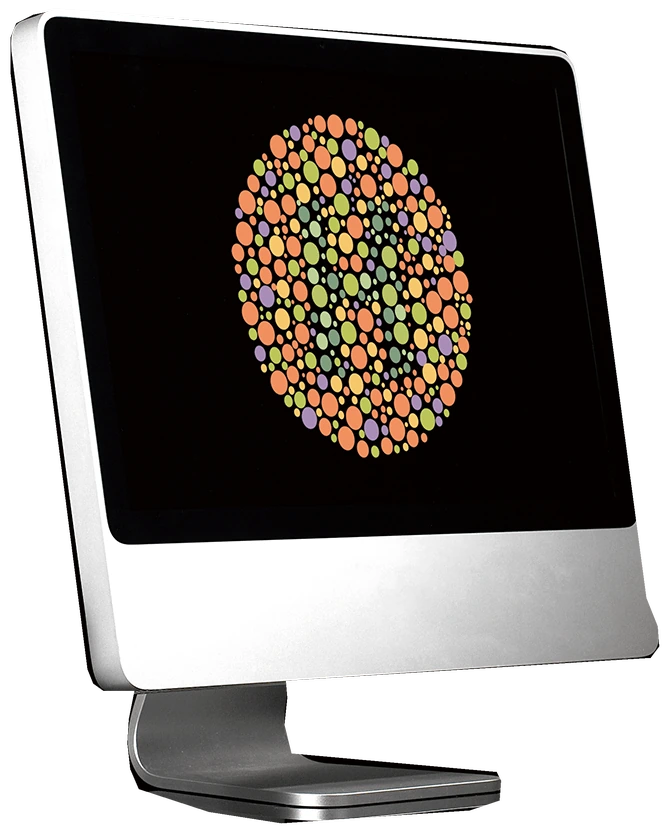
Ishihara test
Protanopia: difficulty distinguishing red shades. Deuteranopia: difficulty distinguishing green shades. Tritanopia: difficulty distinguishing blue shades.
Hue test
The hue test assesses colour discrimination and the ability to distinguish colour shades. Colours are arranged in order according to their position in the spectrum. Used in vision science, the arts and other fields to assess colour perception accuracy. 1. The test contains rows of coloured caps or rectangles in a mixed order. 2. They are rearranged to form a continuous gradient between fixed colours at the start and end of each row. 3. Results are analysed: errors in particular parts of the spectrum may indicate colour perception difficulties, for example with blue or green tones. 4. A score is assigned according to the number of arrangement errors. 5. Used in occupations where colour discrimination is important: graphic design, photography, printing, cosmetics and others. 6. Used to study visual fatigue and age-related changes in colour vision.
Colour chart tests
Medical screening Assessment of abnormalities associated with ocular disease or inherited colour perception conditions. Occupational use Assess colour vision for occupations requiring precise shade perception, such as design, printing and cosmetics. Industrial use Assess visual abilities against workplace safety or quality standards.
Specifications
Landolt ring, alphabet, numbers and reversed E. Children's figures, Russian letters and Hiragana. Functional charts (red/green, cross cylinder, binocular balance, fusion suppression, phoria, aniseikonia, stereopsis, etc.). Masking filter: Dot, line, column. Red/green filter. Settings Remote control IR channel selection (10 channels). Film or photo mode. Standby mode. Contrast adjustment. Red/green balance. Colour adjustment for the red/green filter. Randomisation. Chart spacing adjustment. Chart background selection. Tests Colour vision test. HUE test. Contrast sensitivity test. Vergence, saccade and stereopsis training. Custom programs (2 supported).
Technical information
Technical specifications & documentation
Product information, specifications and available documentation in one place.
Product specifications overview
Key documented information for this exact model.
Technical specifications
- Mounting
- Wall mounting
- Maximum distance
- 6 m
- Display
- 24-inch LCD; 1920 × 1080
- Connectivity
- USB · CAN · IR · Wi-Fi · Bluetooth 3.0
- Power supply
- 12 V DC 4 A; 100–250 V AC 50–60 Hz adapter
- Dimensions
- 568 × 80 × 336 mm
- Weight
- 6.1 kg
Downloads & resources
Available product sheets and public manufacturer resources.
No public manufacturer document has been verified for this model. Contact ASEM for the available documentation.
Sources and documentation
- https://huvitz.com/wp-content/uploads/2024/11/HDC-9100NPF_4p_kor_240828_%EC%B5%9C%EC%86%8C.pdfVerified on 2026-10-05
- https://huvitz.com/wp-content/uploads/2025/02/HDC-9100NPF_4p_eng_240828.pdfVerified on 2026-10-18
- https://huvitz.com/wp-content/uploads/2024/11/HDC-9100NPF_4p_eng_240828_%EC%B5%9C%EC%86%8C-1.pdfVerified on 2026-10-18
Frequently asked questions
Your questions about HDC-9100N/PF
Clear answers based on the available product information.

What is the documented Mounting of HDC-9100N/PF?
Wall mounting
View sourceWhat is the documented Maximum distance of HDC-9100N/PF?
6 m
View sourceDo both versions have a polarised panel?
No. The specification distinguishes non-polarised N and polarised PF. The combined HDC-9100N/PF title does not confirm the delivered version or included glasses.
View sourceWhich test distance can be set?
The specification gives 1.5–6 m in 0.1 m steps. This setting must correspond to the actual examination-station distance.
View sourceIs Wi-Fi communication standard?
The brochure presents the Wi-Fi link with HDR-9000 as an option. Infrared control and the USB function are described separately.
View sourceASEM support
More than a device, a long-term partnership
Discuss your project with ASEM: equipment selection, installation, training and technical support.
Installation
Discuss the installation requirements and configuration with our technical team.
Learn more

After-sales service
Contact ASEM for technical assistance and the support appropriate to your equipment.
Learn more

Related products
Explore equipment with related technologies and clinical uses.
Clinical applications
Explore the ASEM clinical catalogue
Browse related areas of the ASEM catalogue. These links do not extend the indications of this device.
Explore all products