
HDC-7000
Digital visual tests for refraction and binocular vision.
Stereopsis, fusion and fixation disparity tests.
Key advantages
The documented strengths of HDC-7000, at a glance.
Binocular vision
Stereopsis, fusion and fixation disparity tests.
Customisable tests
Contrast, masks, red/green and mirrored presentation.
PC-based installation
Tests on a compatible PC and screen to be specified.
Separate PC and screen
Capabilities in practice
A closer look at the functions and technology of HDC-7000.
Present binocular-vision tests
The 41 charts include binocular balance, aniseikonia, stereopsis and fusion. Masks and red/green adjustments extend presentation on a compatible screen.
- Binocular balance, aniseikonia, stereopsis and fusion.
- 41 charts in the documented library.
Designed for a smoother workflow
Calibrate distance and mirror mode
Test distance adjusts from 2.5 to 6 m in 0.1 m steps. Mirror mode supports smaller-room installation with optical-path calibration.
- Distance from 2.5 to 6 m in 0.1 m steps.
- Mirror mode to adapt the optical path.
Select the mask and presentation settings
The remote selects the chart area to display and the contrast and colour settings.
- Single-optotype, horizontal-row or column mask.
- Contrast and red/green balance adjustment.
Designed for daily practice
Explore the documented features and practical configuration of HDC-7000.
Prepare sequences on a compatible installation
Chart order can be programmed and characters displayed randomly. HDC-7000 is a software-and-control solution: the PC, screen and their compatibility must be defined.
Separate PC and screen
- Programmable order for frequently used charts.
- 17-, 19-, 20-, 23- and 24-inch screens in the brochure.
Connect the PC and refractor control
The brochure describes receiver interfaces and compatible refractors of this generation.
- USB connection to the PC and CAN to HDR/CDR.
- Documented compatibility with HDR-7000 and CDR-3100.
Calibrating distance and display
Examination distance adjusts from 2.5 to 6 m in 0.1 m increments. Documented compatible monitor sizes are 17, 19, 20, 23 and 24 inches; actual dimensions and resolution must be considered during calibration. Mirror mode supports small-room configurations without eliminating the need to verify optical distance.
Defining the configuration with ASEM
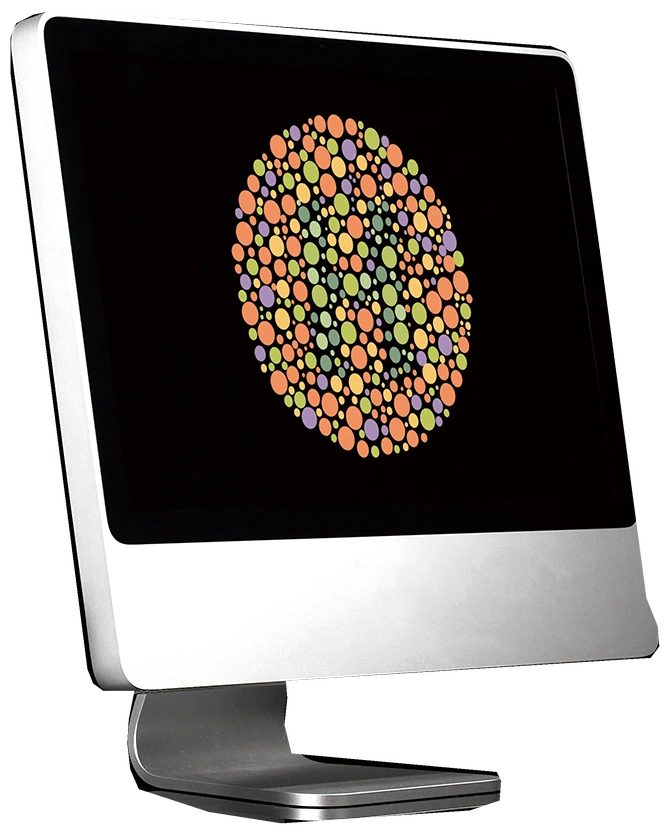
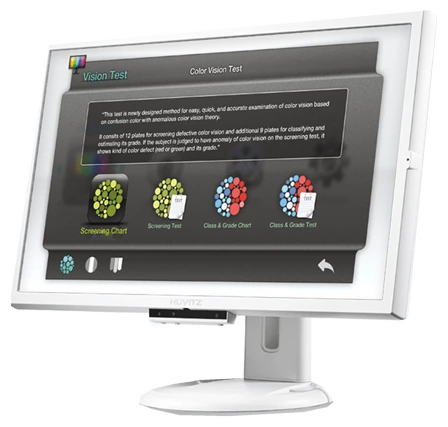
The chart system must be configured with a suitable computer and monitor. The official photograph illustrates one possible installation and does not prove that this computer is supplied. Software compatibility and operating system versions must be confirmed for the proposed configuration rather than copied from an old brochure.
Technical information
Technical specifications & documentation
Product information, specifications and available documentation in one place.
Product specifications overview
Key documented information for this exact model.
Technical specifications
- Minimum distance
- 2.5 m
- Maximum distance
- 6 m
- Display
- Compatible 17, 19, 20, 23 or 24-inch monitors; display to be specified, no fixed panel included
- Connectivity
- USB to PC · CAN/IR to HDR/CDR · Infrared remote control
- Adjustment ranges
- Screen calibration; distance in 0.1 m increments; contrast, red/green, mask, random and mirror
- Power supply
- USB receiver 5 V, 100 mA, 0.5 W; PC and monitor powered separately
Downloads & resources
Available product sheets and public manufacturer resources.
No public manufacturer document has been verified for this model. Contact ASEM for the available documentation.
Sources and documentation
- https://www.huvitz.com/product/hdc-7000/Verified on 2026-10-06
- https://huvitz.com/wp-content/uploads/2024/10/HDC-7000_2p_eng_20080828.pdfVerified on 2026-10-18
Frequently asked questions
Your questions about HDC-7000
Clear answers based on the available product information.

What is the documented Minimum distance of HDC-7000?
2.5 m
View sourceWhat is the documented Maximum distance of HDC-7000?
6 m
View sourceDoes the brochure establish support for modern operating systems?
The archived brochure lists Windows 2000, XP and Vista. It does not alone establish compatibility with a current system; the software configuration needs confirmation.
View sourceCan a single optotype be shown without the full row?
Yes. The brochure provides single-optotype, horizontal-row and column masks operated by the infrared remote.
View sourceWhich screens does the brochure describe?
It lists 17-, 19-, 20-, 23- and 24-inch sizes. The PC, resolution and calibration to the actual distance must be defined for the installation.
View sourceASEM support
More than a device, a long-term partnership
Discuss your project with ASEM: equipment selection, installation, training and technical support.
Installation
Discuss the installation requirements and configuration with our technical team.
Learn more

After-sales service
Contact ASEM for technical assistance and the support appropriate to your equipment.
Learn more

Related products
Explore equipment with related technologies and clinical uses.
Clinical applications
Explore the ASEM clinical catalogue
Browse related areas of the ASEM catalogue. These links do not extend the indications of this device.
Explore all products